 Call us now:


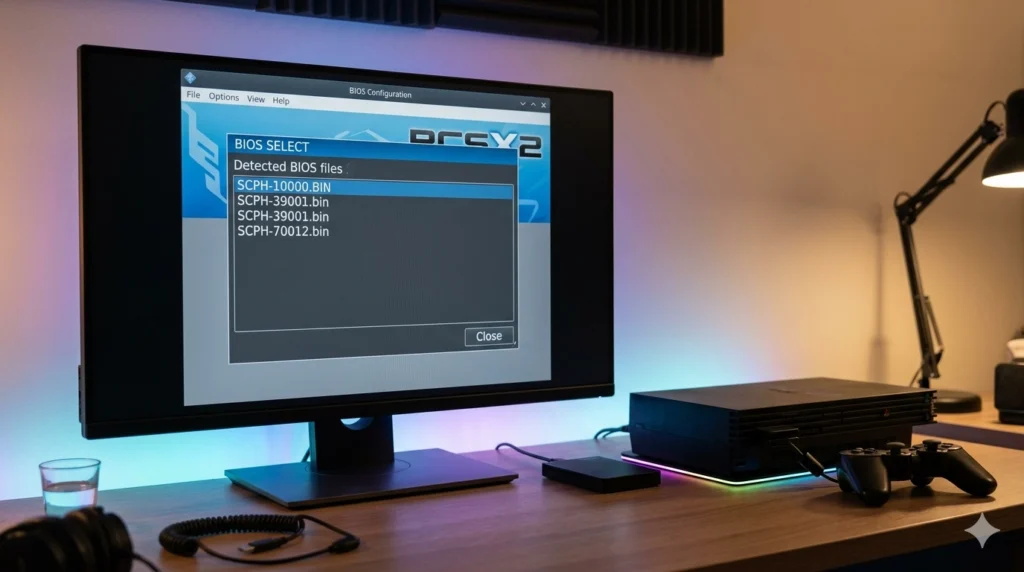
A PS2 BIOS is the small firmware file that tells your PlayStation 2, or an emulator like PCSX2, how to boot up and talk to the hardware. Without it, PCSX2 won’t load a single game — it’ll just sit there staring at a blank screen. If you’re setting up PS2 emulation for the first time, getting the right BIOS file in the right place is step one, before you even think about ISOs or controller configs.
I’ve set up PCSX2 on more machines than I can count, from a dusty old laptop in 2013 to a Steam Deck last year. The BIOS part trips up almost everyone the first time. Not because it’s technically hard — it’s actually one of the simplest steps — but because there’s so much bad or outdated advice floating around forums.
Let’s fix that here.
What Is a PS2 BIOS, Exactly?
The BIOS (Basic Input/Output System) on a PS2 is the startup software baked into the console’s hardware. It’s what runs the second you hit the power button, before any disc even spins up.
Think of it like the ignition system in a car. The engine (your game) can’t start until the ignition (BIOS) fires first. On the actual PlayStation 2 console, this BIOS lives on a physical chip soldered to the motherboard. You never see it, you never touch it, it just quietly does its job every time you turn the machine on.
For emulation, this changes. PCSX2 doesn’t come with a BIOS built in — Sony never gave permission for that, and legally it can’t. So the emulator asks you to supply your own PS2 BIOS file, usually around 4MB in size, before it’ll boot anything.
Why Do You Need a PS2 BIOS File for Emulation?
You need it because PCSX2 is built to behave exactly like real PS2 hardware, and real PS2 hardware needs a BIOS to function at all. No BIOS ROM for PS2, no boot sequence, no game.
Here’s a specific example. If you drop a copy of God of War 2 into PCSX2 without loading a BIOS file first, the emulator will throw an error along the lines of “No BIOS available.” It won’t even attempt to launch the ISO. This isn’t a bug — it’s the emulator doing exactly what it’s supposed to do.
The BIOS also handles things people don’t think about:
- Memory card formatting and detection
- The PS2’s system menu (the one with the browser, disc utility, and settings)
- Region-specific behavior (PAL vs NTSC timing, for instance)
- Firmware-level compatibility checks some games rely on
So when someone says “ps2 bios” like it’s just a boring technical formality, they’re underselling it. It’s doing more work than most emulator users realize.
Where Does the PS2 BIOS File Come From?
This is where things get a little sensitive, so let’s be straightforward about it.
Dumping Your Own BIOS ROM for PS2
The correct, legal way to get a PS2 BIOS file is to extract it from a PS2 console you actually own. Sony’s licensing terms mean the BIOS is tied to owning the hardware — it’s not something meant to be freely copied and shared.
Here’s how people typically dump their own BIOS:
- Get a PS2 with a memory card slot that supports free McBoot (FMCB) or a similar homebrew loader.
- Install FMCB onto a memory card using a tool like uLaunchELF or a pre-made FMCB memory card image.
- Boot the PS2 with the modded memory card inserted.
- Run a BIOS dumping tool (PS2 BIOS Dumper is the common one) from the homebrew menu.
- Save the dumped file onto a USB drive plugged into the console.
- Transfer that file to your PC.
The whole process takes maybe 20–30 minutes if you’ve got the hardware ready. It sounds more complicated than it is.
Is Downloading a PS2 BIOS Online Legal?
Technically, no — not if you don’t own the console it came from. The BIOS is copyrighted software owned by Sony, and redistributing it violates that copyright, even though PS2 consoles haven’t been sold new in over a decade.
In practice, a huge number of PCSX2 users search for “ps2 bios download” or “download ps2 bios rom” and grab a file from a random site. I’m not going to pretend that doesn’t happen constantly — it does. But there are real risks beyond the legal gray area:
- Downloaded BIOS files are a common vector for malware bundling
- Many shared files are corrupted, incomplete, or mismatched (wrong region reported)
- Some “PS2 BIOS USA” files floating around forums are actually mislabeled EU or JP dumps
If you do go this route, at minimum, check the file size (should be 4,096 KB) and scan it before use. But dumping your own from a console you own is genuinely the safer, cleaner path, and it’s not that much extra effort.
PS2 BIOS Versions — USA, Europe, Japan (Which One to Pick)
Not all PS2 BIOS files are interchangeable. The version you use affects language, region-locking behavior, and sometimes video timing (NTSC vs PAL).
| Region | Common File Name Pattern | Video Standard | Best For |
|---|---|---|---|
| USA | scph39001.bin / scph70012.bin | NTSC | Most North American game ISOs |
| Europe | scph50004.bin | PAL | European game releases |
| Japan | scph77001.bin | NTSC-J | Japanese imports, some fan translations |
A common mistake: someone downloads a “PS2 BIOS ROM USA” file, then tries to run a European PAL game with it. The game might still launch, but you’ll often get black bars, wrong frame timing, or slowdown that has nothing to do with your PC’s specs.
Match your BIOS region to the games you actually play most. If you’re mostly running US releases, grab a US BIOS (SCPH-39001 or SCPH-70012 are the most common versions people use with PCSX2). If your ISO collection is mostly PAL, use a European BIOS instead.
How to Set Up the PS2 BIOS in PCSX2
Once you’ve got your BIOS file — dumped or otherwise — pointing PCSX2 to it takes about two minutes.
Step-by-Step BIOS Setup Guide
- Create a folder named “bios” inside your main PCSX2 directory (if it doesn’t already exist).
- Copy your PS2 BIOS file into that folder. File extensions are usually .bin or .rom.
- Open PCSX2 and go to Settings > BIOS.
- Click “Refresh List” — PCSX2 should now detect your BIOS file and show details like region and version number.
- Select the correct BIOS from the list.
- Restart PCSX2 to apply changes, then try loading a game ISO.
If the BIOS doesn’t show up in that list after refreshing, the file is either corrupted, incomplete, or sitting in the wrong folder. Double-check the file size first — a legitimate PS2 BIOS file is almost always exactly 4MB (4,096 KB). If yours is 200KB or 50MB, something’s wrong with the download.
Common PS2 BIOS Errors and How to Fix Them
These come up constantly on PCSX2 forums and Reddit threads. Here’s a rundown of the usual suspects:
“BIOS not found” or empty BIOS list
- The file isn’t in the /bios folder PCSX2 is looking at
- Fix: confirm the folder path under Settings > Folders matches where you actually saved the file
Game freezes at PS2 logo screen
- Often caused by a corrupted or incomplete BIOS dump
- Fix: try re-dumping from console, or verify checksum against known good file sizes
Black screen after BIOS loads
- Usually a graphics plugin conflict, not the BIOS itself
- Fix: switch renderer in Graphics settings (Direct3D 11 vs OpenGL vs Vulkan) and test again
Wrong language or region menu appears
- You loaded a BIOS from the wrong region
- Fix: swap to a BIOS matching your game’s region, not just any PS2 bios file you had lying around
“Unable to load BIOS” crash on startup
- File extension issue, or file was renamed incorrectly during download
- Fix: verify it ends in .bin and hasn’t been altered from its original dumped format
One thing worth mentioning: a lot of people blame PCSX2 itself when the real issue is a bad BIOS ROM for PS2 they grabbed from an untrustworthy source. If your emulator behaves oddly on multiple games, not just one, the BIOS file is usually the first thing to re-check.
PS2 BIOS File Naming and Formats You’ll See
BIOS files don’t follow one universal naming convention, which confuses newcomers browsing forums or file-sharing sites. You might see the same file called:
- ps2 bios file
- ps2bios.bin
- SCPH-70012.bin
- ps2-bios rom
- bios rom ps2
They’re all referring to the same category of file — a dumped PS2 firmware image. What actually matters isn’t the file name but three things: file size (4MB), region match, and source integrity (not corrupted).
Some people search specifically for “baixar bios ps2,” which is just Portuguese for “download ps2 bios” — same file, same rules apply regardless of language or country.
What Most Guides Get Wrong About PS2 BIOS Files
Most tutorials treat the BIOS step like a five-second checkbox and move straight to game ISOs. That’s backwards, honestly, because BIOS problems cause more PCSX2 setup failures than graphics settings, controller configs, and ISO issues combined.
Another thing rarely mentioned: PCSX2’s newer versions (1.7 and the Qt-based builds from 2023 onward) handle BIOS detection differently than the old 1.4/1.6 builds did. If you’re following a five-year-old YouTube tutorial with a modern PCSX2 download, the menu layout for BIOS settings won’t even match what’s on your screen. Always check the PCSX2 version you’re actually running before following region-specific setup steps.
And one opinion I’ll stand by: dumping your own BIOS is worth the 30-minute hassle if you’ve still got an old PS2 sitting around. It guarantees a clean, correctly matched file, and it sidesteps the malware risk entirely. Most people skip this step out of impatience, then spend two hours troubleshooting a bad download instead.
FAQ Section
Do I need a PS2 BIOS to use PCSX2?
Yes. PCSX2 requires a valid PS2 BIOS file to boot any game — without it, the emulator won’t get past the initial loading screen. There’s no way around this requirement; it’s built into how the emulator mimics real PS2 hardware.
Can I use any PS2 BIOS file with any game?
Not ideally. While a mismatched region BIOS might still run a game, you can run into display issues, wrong frame timing, or menu language problems. Match your BIOS region (USA, Europe, or Japan) to the games you play most often.
Is it illegal to download a PS2 BIOS online?
Technically yes, unless you’re dumping it from a console you personally own. Sony holds the copyright on PS2 BIOS software, so sharing or downloading it without owning the source hardware violates that copyright, even though enforcement against individual downloaders is essentially nonexistent.
How big should a PS2 BIOS file be?
A legitimate PS2 BIOS file is almost always exactly 4,096 KB (4MB). If a downloaded file is significantly smaller or larger than that, it’s likely corrupted, fake, or bundled with something you don’t want.
Why does PCSX2 say “No BIOS available”?
This means PCSX2 either can’t find a BIOS file in its designated folder, or the file it found is corrupted or invalid. Check Settings > Folders to confirm the BIOS path matches where your file is saved, then click “Refresh List” under Settings > BIOS.
What’s the difference between SCPH-39001 and SCPH-70012 BIOS files?
Both are USA region BIOS versions, but they come from different PS2 hardware revisions (SCPH-70012 is from a later, slimmer PS2 model). Functionally, most PCSX2 users won’t notice a difference in day-to-day use — either works fine for NTSC USA games.
Conclusion
Getting your PS2 BIOS set up correctly is genuinely the one step that determines whether your entire PCSX2 experience goes smoothly or turns into hours of troubleshooting. Dump your own file from a console you own if you can, match the region to your games, and double-check that 4MB file size before blaming the emulator for anything.
For more useful articles, visit my website: PStoBios.com.
[…] the moment you tried to load a game, you’re not alone. The fix is simple: PCSX2 needs a real PS2 BIOS file to run any game, and that file has to come from a PlayStation 2 console you own — the […]
[…] things get tricky is the games and the BIOS file. Downloading a PS2 BIOS from a random file-sharing site is technically piracy, even though a five-second Google search […]
[…] bundling is a real risk. BIOS files are tiny, so scammers often wrap them in installers loaded with adware or […]
[…] owns the copyright on PS2 BIOS firmware. Dumping it from a console you personally own falls under fair use in most countries, […]
[…] PS2 Emulator BIOS is the PlayStation 2 system software that PCSX2 uses to start games and reproduce the […]